🔵 Area of a Circle Calculator
Calculate circle area, circumference, diameter, and radius with detailed explanations
📐 Circle Formulas:
• Area = π × r² (where r is radius)
• Circumference = 2 × π × r
• Diameter = 2 × r
Enter Circle Measurements
📊 Calculation Results
In today’s fast-moving digital world, mathematics is no longer limited to classrooms, textbooks, or long manual calculations on paper. Whether you are a student solving geometry homework, an engineer designing mechanical components, an architect planning a circular structure, or even a homeowner measuring a round garden, precision matters. This is exactly where an Area of a Circle Calculator becomes incredibly useful.
Understanding how to calculate the area of a circle is one of the most fundamental skills in geometry. The concept may look simple at first glance, but when applied to real-world projects—especially those involving unit conversions, large numbers, or decimal precision—manual calculations can quickly become time-consuming and prone to error. A reliable digital solution helps remove complexity while maintaining mathematical accuracy.
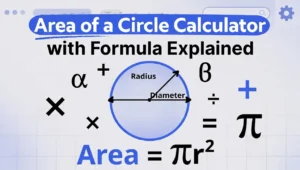
At its core, the area of a circle is determined using a well-known formula:
A = πr²
This formula shows that the area depends on two key elements: the radius (r) and the mathematical constant pi (π). While the equation itself is straightforward, challenges often arise when:
- Only the diameter is given instead of the radius
- Measurements are provided in different units
- Precision beyond two decimal places is required
- Multiple circular areas must be calculated in sequence
A modern geometry calculator eliminates these obstacles instantly. Instead of manually converting diameter to radius or worrying about squaring errors, users simply input the known value and receive accurate results within seconds.
Why Circle Area Still Matters in 2026
You might wonder—why is calculating circular area still so important today? The answer lies in how frequently circular shapes appear in real life. From industrial machinery and pipe cross-sections to digital graphics and urban landscaping, circles are everywhere.
Here are just a few examples where circle measurements play a critical role:
- Construction and architecture – calculating flooring for round rooms, domes, and columns
- Engineering and manufacturing – measuring rotating parts, gears, and cylindrical components
- Landscaping and gardening – estimating soil coverage for circular lawns or irrigation systems
- Education and STEM programs – teaching geometry principles through practical application
- Digital design and UI development – creating scalable circular elements in modern interfaces
Because these applications demand accuracy, relying on mental math or handwritten formulas can introduce costly mistakes. Even a small miscalculation in radius squaring can significantly affect the final result.
The Shift from Manual Math to Smart Digital Tools
Traditionally, students were trained to calculate everything manually to strengthen conceptual understanding. That foundation is still essential. However, in professional environments, speed and efficiency are just as important as accuracy.
Digital math tools have evolved dramatically over the past decade. Today’s online calculators offer:
- Instant computation
- Automatic unit conversion (cm², m², inches², feet²)
- High-precision π values
- Error detection for invalid inputs
- Mobile-friendly interfaces
Instead of replacing mathematical knowledge, these tools enhance productivity. They allow users to focus on problem-solving and design rather than repetitive arithmetic steps.
Who Should Use This Tool?
An Area of a Circle Calculator is not limited to math students. It serves a broad audience:
- Elementary to university students
- Teachers and tutors
- Engineers and technical professionals
- Architects and interior designers
- Contractors and builders
- DIY enthusiasts
- Researchers and analysts
If you work with circular dimensions in any capacity, a precise and fast calculation method becomes indispensable.
What You Will Learn in This Guide
This comprehensive guide will explore:
- The circle area formula explained in simple terms
- The relationship between radius, diameter, and π
- Step-by-step calculation methods
- Real-life examples and practical applications
- Common mistakes and how to avoid them
- Advanced circle geometry concepts
- How to choose the best digital tool for your needs
By the end, you will not only understand how to calculate area efficiently, but also why this fundamental geometry concept remains highly relevant in modern industries and education systems.
Mathematics does not have to feel complicated. With the right explanation and the right tools, even classic formulas become powerful assets for solving everyday problems.
Understanding the Circle Area Formula (Radius, Diameter & π Explained)
Calculating the area of a circle is one of the most fundamental skills in geometry circle calculation. Whether you are a student, teacher, engineer, or just using an online circle area calculator, understanding why the formula works makes math far more intuitive and practical.
The Mathematical Formula Behind Circle Area
At the core of every circle calculation lies one simple but powerful equation.
A = πr² — Explained Clearly
The area of a circle is calculated using this formula:
A = π × r²
Where:
- A = area of the circle
- π (pi) = a mathematical constant
- r = radius (the distance from the center to the edge)
This formula works for any circle size, from a tiny coin to a massive stadium.
Why the Radius Is Squared
The radius is squared because area measures two-dimensional space. When you square the radius, you’re calculating how much surface the circle covers, not just how wide it is. Think of it as measuring how many tiny squares could fit inside the circle’s boundary.
Visual Reasoning Made Simple
Imagine slicing a circle into many thin wedges and rearranging them into a shape close to a rectangle. The height becomes the radius (r), and the width becomes half the circumference (πr). Multiply them together, and you naturally get πr². This visual approach helps students grasp math formulas more intuitively.
Using Diameter Instead of Radius
Many people measure circles using diameter instead of radius, and that’s perfectly fine.
Converting Diameter to Radius
The relationship is simple:
Radius = Diameter ÷ 2
Once you have the radius, you can use the standard formula without confusion.
Formula Variation: A = π(d/2)²
If you only know the diameter, use this version:
A = π × (d/2)²
This circle formula with diameter is commonly used in construction, design, and manufacturing where full width measurements are more practical.
What Is Pi (π) and Why It Matters
Pi (π) is the key reason circles behave differently from squares or triangles.
Approximate Values of Pi
Pi is an irrational number, meaning it never ends or repeats. Common approximations include:
- 3.14 (basic calculations)
- 22/7 (fractional estimate)
- 3.14159… (higher precision)
For most real-world geometry circle calculations, 3.14 is accurate enough.
Scientific Calculator Precision
Modern scientific calculators and digital math tools use much higher precision for π. This is especially important in engineering, physics, and advanced geometry where tiny errors can add up.
When Rounding Is Acceptable
Rounding is fine for:
- School assignments
- Daily measurements
- Quick estimates
However, avoid heavy rounding in scientific or professional calculations where accuracy is critical. The value of pi 2026 standards remains unchanged, but calculator precision keeps improving.
How an Area of a Circle Calculator Works
An online circle area calculator simplifies complex math into instant results, making it a favorite free math calculator for students and professionals alike.
Input Fields and Instant Results
Most calculators are designed for flexibility and speed.
Radius Input
Enter the radius directly, choose the unit, and the calculator instantly applies the πr² formula.
Diameter Input
If you only know the diameter, the calculator automatically converts it into radius before calculating the area.
Supported Units
Common units include:
- centimeters (cm)
- meters (m)
- inches (in)
- feet (ft)
This makes the tool practical for both academic and real-world use.
Automatic Unit Conversion Features
One of the most powerful features of an instant geometry calculator is unit conversion.
cm² to m² Conversion
Useful for scaling up small measurements into larger projects like flooring or landscaping.
inch² to ft² Conversion
Common in architecture and interior design using the imperial system.
Metric vs Imperial Systems
A good digital math tool handles both systems seamlessly, eliminating manual conversion errors.
Behind the Scenes: The Algorithm Logic
While calculators look simple on the surface, smart logic runs underneath.
Formula Automation
The calculator identifies whether you entered a radius or diameter and applies the correct math formula automatically.
Error Handling
Invalid inputs such as negative numbers or missing values trigger warnings, ensuring reliable results every time.
Rounding Precision Options
Many calculators allow users to choose how many decimal places they want, balancing readability and accuracy.
Step-by-Step: How to Use an Area of a Circle Calculator Correctly
An area of a circle calculator is a simple digital tool, but using it correctly still matters. When done right, it can save time, improve accuracy, and help you understand real life circle calculations better—from geometry homework help to practical daily use.
Step 1 – Identify the Radius or Diameter
Before using any calculator, you need one key value: radius or diameter.
- Radius is the distance from the center of the circle to the edge.
- Diameter is the full distance across the circle, passing through the center.
Most calculators allow you to input either value. If you only know the diameter, remember this simple rule:
- Radius = Diameter ÷ 2
This step is essential in avoiding common circle math mistakes.
Step 2 – Choose Measurement Units
Always select the correct unit before calculating. Common units include:
- centimeters (cm)
- meters (m)
- inches (in)
- feet (ft)
Consistency is key. If the radius is in centimeters, the result will be in square centimeters (cm²). Mixing units is one of the most frequent geometry calculation errors, especially in math exam preparation.
Step 3 – Click Calculate
Once the radius (or diameter) and units are set, click the Calculate button.
Behind the scenes, the calculator applies the standard formula:
- Area = π × r²
Digital calculation tools automatically handle π (pi) and square the radius correctly, reducing human error and saving time.
Step 4 – Interpret the Output
The calculator will display the area in square units. Take a moment to understand what the number means:
- Larger radius → much larger area
- Small changes in radius can significantly affect the result
This understanding helps when solving circle area example problems or checking answers manually.
Example 1 – Small Object (Coin Surface)
Imagine a coin with a radius of 1.2 cm.
- Calculator input: Radius = 1.2 cm
- Result: Area ≈ 4.52 cm²
This is a common example in geometry homework help, showing how even small objects involve precise calculations.
Example 2 – Medium Object (Round Table)
A round table has a diameter of 1.4 meters.
- Convert diameter to radius: 0.7 m
- Calculator result: Area ≈ 1.54 m²
This is a great example of real life circle calculations used in furniture planning or interior design.
Example 3 – Large Surface (Circular Garden)
A circular garden has a radius of 6 meters.
- Calculator result: Area ≈ 113.1 m²
Landscaping, flooring estimates, and construction planning often rely on accurate circle area calculations like this.
Manual Calculation vs Area of a Circle Calculator
Both methods have value. Knowing when to use each one improves both learning and efficiency.
Manual Calculation Advantages
Manual circle area calculation still plays an important role, especially in education.
- Learning mathematics
Helps students understand the formula, logic, and geometry concepts deeply. - Exam preparation
Many math exams require handwritten solutions without calculators.
Practicing manual methods builds confidence and reduces dependency on tools.
Calculator Advantages
Using an area of a circle calculator offers several practical benefits:
- Speed
Instant results with minimal input. - Accuracy
Correct π value and precise squaring every time. - Reduced human error
No forgotten steps or calculation slips. - Complex decimal handling
Ideal for advanced measurements and professional use.
This makes calculators perfect for digital calculation tools in real-world applications.
When to Use Which Method
- Use manual calculation for learning, practice, and math exam preparation.
- Use a calculator for real life circle calculations, work projects, and quick checks.
Combining both approaches leads to better math accuracy and understanding.
Common Mistakes When Calculating Circle Area
Even simple formulas can cause errors. Here are the most common ones—and how to avoid them.
Confusing Radius and Diameter
Using the diameter as if it were the radius doubles the value and quadruples the area. This is one of the most frequent geometry calculation errors.
Forgetting to Square the Radius
Some learners calculate π × r instead of π × r². This mistake drastically reduces the final result and appears often in circle math mistakes.
Using Incorrect Pi Value
Using π as 3 instead of 3.14 (or more precise values) may be acceptable in rough estimates but reduces accuracy in real applications.
Wrong Unit Conversion
Failing to convert units properly—such as mixing centimeters with meters—leads to incorrect answers and poor math accuracy tips implementation.
How a Calculator Prevents These Errors
An area of a circle calculator automatically:
- Uses the correct π value
- Squares the radius properly
- Maintains unit consistency
- Eliminates most manual input errors
This makes it a reliable tool for both students and professionals who want accurate, stress-free results.
Real-World Applications of the Area of a Circle Calculator
The area of a circle calculator is no longer just a classroom utility. In 2026, it has become a practical construction area calculator, an engineering geometry tool, and a daily problem-solver across many industries. From building design to education, circle measurement in real life plays a bigger role than most people realize.
Architecture and Construction
In architecture and construction, accuracy saves both time and budget. Circular measurements are common in modern design, and digital calculators help professionals avoid manual errors.
Flooring Estimation
When dealing with round spaces, estimating flooring material manually can lead to costly mistakes. An area of a circle calculator allows contractors to quickly determine how much tile, vinyl, or wood flooring is required. This is especially useful for:
- Circular lobbies
- Spiral stair landings
- Round hallways
Using a construction area calculator ensures minimal waste and better cost control.
Circular Rooms
Circular rooms are increasingly popular in eco-friendly and luxury home designs. Architects rely on precise circle measurement in real life to:
- Plan furniture layouts
- Calculate usable living space
- Optimize lighting placement
A small miscalculation can impact both aesthetics and functionality.
Dome Structures
Domes are widely used in mosques, sports arenas, planetariums, and sustainable housing projects. Calculating the base area of a dome is critical for load distribution and material planning. Digital tools simplify these complex calculations, especially when combined with other geometry formulas.
Engineering and Manufacturing
Engineering fields depend heavily on precision. The area of a circle calculator acts as a reliable engineering geometry tool in both design and production stages.
Pipe Cross-Sections
Pipes are everywhere—oil and gas, water systems, and industrial plants. Engineers calculate pipe cross-sectional areas to determine:
- Fluid flow rates
- Pressure capacity
- Material strength
Accurate calculations improve efficiency and safety in large-scale systems.
Mechanical Parts
Many mechanical components such as gears, bearings, and discs are circular. Knowing the exact area helps engineers:
- Estimate material usage
- Reduce manufacturing waste
- Maintain quality control
This is where smart geometry calculators save hours of manual work.
Rotating Components
Rotating parts like flywheels and turbines depend on balanced mass distribution. Calculating circular areas helps engineers predict rotational behavior and prevent mechanical failure.
Landscaping and Gardening
Landscaping may look artistic, but it’s deeply mathematical behind the scenes. Circular designs are common, and precise measurement matters.
Circular Lawns
Circular lawns and garden features require accurate area calculations to estimate:
- Grass seed quantity
- Fertilizer coverage
- Maintenance costs
Using a calculator ensures consistent growth and visual symmetry.
Irrigation Design
Sprinkler systems often spray water in circular patterns. Designers calculate coverage areas to:
- Avoid dry spots
- Reduce water waste
- Improve efficiency
This practical circle measurement in real life supports sustainable landscaping.
Pool Area Measurement
Round pools are popular in residential and resort settings. Calculating the surface area helps in planning:
- Pool liners
- Heating systems
- Chemical treatment quantities
Education and Academic Use
Education remains one of the strongest use cases for area of a circle calculators, especially with the rise of digital learning.
Classroom Learning
Teachers use calculators to demonstrate concepts visually and interactively. Students can focus on understanding geometry rather than struggling with repetitive math steps.
STEM Programs
STEM education emphasizes real-world problem solving. Circle area tools help students connect formulas to practical applications in engineering, physics, and design.
Online Assignments
With more online education platforms, students use calculators to:
- Verify homework answers
- Practice geometry problems
- Learn independently
These tools support self-paced and remote learning environments.
Advanced Circle Geometry Concepts Beyond Basic Area
Once the basic area formula is mastered, learners and professionals often move on to more advanced geometry concepts. Modern calculators now support these advanced functions.
Circumference vs Area – Key Differences
The difference between circumference and area is a common source of confusion.
- Circumference measures the distance around a circle
- Area measures the space inside the circle
Understanding the circumference vs area difference is essential in engineering, construction, and design tasks where both values are required.
Sector Area Calculation
A sector is a portion of a circle defined by a central angle. A circle sector calculator helps determine the area of:
- Pie-shaped regions
- Rotational machine parts
- Architectural segments
This calculation is widely used in mechanical and civil engineering.
Segment Area Formula
A circle segment is formed when a chord cuts through a circle. Circle segment calculation is useful in:
- Bridge design
- Structural analysis
- Industrial component modeling
Advanced calculators simplify what would otherwise be complex trigonometric work.
Annulus (Ring-Shaped Area) Calculation
An annulus is the area between two concentric circles. The annulus area formula is frequently used in:
- Washer-shaped components
- Road and track design
- Insulation planning
Combining Multiple Circular Areas
Some projects involve overlapping or nested circles. Modern tools allow users to combine multiple circular areas to get accurate total measurements.
Area with Partial Angles
Partial-angle calculations are essential when dealing with incomplete circles, such as curved walls or arc-shaped platforms. Advanced calculators handle these cases with ease.
Benefits of Using an Online Area of a Circle Calculator in 2026
Technology has transformed simple math tools into powerful digital assistants. In 2026, online circle calculators offer far more than basic formulas.
Mobile-Friendly Tools
Mobile-first design allows users to calculate areas directly from smartphones or tablets. This is ideal for:
- On-site construction work
- Field engineering
- Outdoor landscaping projects
AI-Powered Precision Improvements
AI math calculators now detect input errors, suggest corrections, and adapt calculations based on real-world use cases. This leads to:
- Higher accuracy
- Faster results
- Reduced human error
Cloud-Based Educational Platforms
Cloud integration allows students and professionals to save calculations, share results, and collaborate in real time. Online learning tools are now more interactive and accessible than ever.
Integration with STEM Learning Systems
Smart geometry calculators are increasingly embedded into STEM platforms, simulation software, and virtual labs. This integration helps learners apply math concepts directly to real-world scenarios, bridging the gap between theory and practice.
Choosing the Best Area of a Circle Calculator
Selecting the right area of a circle calculator is more than just finding a tool that outputs a number. In 2025, users expect accuracy, speed, flexibility, and a professional experience—whether they are students, teachers, engineers, or business owners. Below are the key factors that define the best online circle calculator today.
Accuracy and Decimal Support
Accuracy is non-negotiable. A high-quality calculator should:
- Use the latest mathematical constants (π with high precision)
- Support multiple decimal places (up to 6–10 decimals for professional use)
- Avoid rounding errors in large or very small measurements
For professional math tools, precision is critical in fields like engineering, construction, and manufacturing. Even a small rounding error can lead to material waste or incorrect design decisions.
Unit Flexibility
A modern fast geometry calculator should allow users to work seamlessly with different units, such as:
- Millimeters (mm)
- Centimeters (cm)
- Meters (m)
- Inches (in)
- Feet (ft)
The ability to switch units instantly without manual conversion saves time and reduces mistakes—especially for professionals working across international standards.
Speed and Interface Simplicity
Speed matters. The best tools deliver results instantly, even on mobile devices or slower connections. Key UI characteristics include:
- Minimal input fields (radius or diameter only)
- Instant calculation without page reloads
- Clear result display with formula explanation
A clean, simple interface ensures that both beginners and advanced users can calculate circle area without confusion.
No Ads and Clean UI
Ads may seem harmless, but they reduce focus and trust. A professional calculator should offer:
- Ad-free or minimal-distraction design
- Clear typography and spacing
- No pop-ups or forced redirects
This is especially important for educational and professional environments where concentration and credibility matter.
Security and Data Privacy
In 2025, data privacy is a major concern. Even simple tools should:
- Avoid collecting personal data
- Not store calculation history without consent
- Use secure connections (HTTPS)
A trustworthy calculator focuses on functionality—not data harvesting.
Educational Insights: Teaching Circle Area Effectively
Understanding the area of a circle is a foundational geometry skill. With the right approach, it can be both intuitive and engaging for learners of all ages.
Explaining Circle Area to Elementary Students
For younger students, simplicity is key. Effective methods include:
- Starting with familiar objects (plates, wheels, coins)
- Explaining that area means “how much space is inside”
- Introducing the formula gradually:
- Area = π × r²
Avoid heavy symbols at first. Focus on concepts before formulas.
Visual Learning Techniques
Visual learning improves retention significantly. Useful techniques include:
- Color-coded diagrams showing radius and diameter
- Breaking a circle into wedges and rearranging them into a rectangle shape
- Animations that show how changing the radius affects the area
Visual explanations help students understand why the formula works, not just how to use it.
Using Interactive Calculators in Classrooms
Interactive tools are now standard in digital classrooms. Teachers can use online calculators to:
- Demonstrate real-time changes in area
- Let students experiment with different radii
- Assign exploration-based learning tasks
A best online circle calculator becomes a teaching assistant, not just a tool.
Practice Problems for Different Levels
Practice should scale with difficulty:
- Beginner: Radius given, whole numbers
- Intermediate: Diameter given, decimals
- Advanced: Real-world scenarios with unit conversion
Mixing theory with practical problems builds confidence and problem-solving skills.
Practical Examples and Sample Calculations (Multiple Scenarios)
Below are real-world inspired examples that show how circle area calculations are used across industries and daily life.
Example 1 – Radius Given
Scenario:
A circle has a radius of 7 cm.
Formula:
Area = π × r²
Calculation:
Area = 3.1416 × 7²
Area ≈ 153.94 cm²
Use Case:
Common in school exercises and basic design planning.
Example 2 – Diameter Given
Scenario:
A circular table has a diameter of 1.2 meters.
Step 1: Find radius
Radius = Diameter ÷ 2 = 0.6 m
Step 2: Calculate area
Area = π × 0.6² ≈ 1.13 m²
Use Case:
Furniture design and interior layout planning.
Example 3 – Real Construction Case
Scenario:
A circular concrete base with a radius of 2.5 meters.
Calculation:
Area = π × 2.5² ≈ 19.63 m²
Why it matters:
Contractors use this value to estimate material volume and cost accurately. This is where professional math tools outperform manual calculations.
Example 4 – Industrial Pipe Cross-Section
Scenario:
An industrial pipe has an internal radius of 15 cm.
Calculation:
Area = π × 15² ≈ 706.86 cm²
Application:
Used in fluid dynamics to calculate flow rate and pressure—precision is critical in industrial engineering.
Example 5 – Circular Farmland Estimation
Scenario:
A circular irrigation system covers land with a radius of 120 meters.
Calculation:
Area = π × 120² ≈ 45,239 m²
Real-world impact:
Farmers use this data to estimate crop yield, water usage, and fertilizer distribution efficiently.
Frequently Asked Questions About Circle Area Calculations
Understanding how to calculate the area of a circle is one of the most common topics in basic geometry. Whether you are a student, engineer, designer, or just someone using an online area of a circle calculator, these frequently asked questions will help clarify the concept and its real-world applications.
Can I Calculate Circle Area Without Knowing Radius?
Yes, it is possible to calculate the circle area without directly knowing the radius, but you will need other related measurements. For example, if you know the diameter, you can easily find the radius by dividing it by two. Since the diameter is twice the radius, the formula becomes straightforward.
In some cases, you may only know the circumference of the circle. Using the formula Circumference = 2πr, you can solve for the radius first, then use it to calculate the area. Many modern circle area calculators allow you to input circumference or diameter instead of radius, making the process faster and more accurate.
Is Pi Always 3.14?
Pi (π) is not exactly 3.14, although this value is commonly used for quick calculations. Pi is an irrational number, meaning it has infinite decimal places without repeating. The true value of pi starts with 3.1415926535 and continues endlessly.
For everyday math problems, using 3.14 is usually accurate enough. However, for advanced calculations in engineering, architecture, or physics, more precise values of pi are required. Most digital area of a circle calculators automatically use a more accurate value of pi, reducing calculation errors in professional projects.
Why Is Radius Squared?
The radius is squared in the circle area formula (Area = π × r²) because area measures two-dimensional space. Squaring the radius accounts for how the size of a circle grows in both width and height simultaneously.
If you double the radius, the area does not simply double—it increases by four times. This relationship explains why small changes in radius can lead to significant changes in total area. Understanding this concept is essential when working with scaling, design optimization, or material estimation.
Can I Use the Calculator for Large Industrial Projects?
Absolutely. An area of a circle calculator can be used for both small-scale and large-scale projects. In industries such as construction, manufacturing, oil and gas, and mechanical engineering, circular area calculations are frequently used for pipes, tanks, wheels, and rotating components.
However, for large industrial projects, accuracy and unit consistency are critical. Always ensure the calculator uses high-precision values of pi and double-check the input units. While calculators are excellent tools, professional projects should still include verification by engineers or technical specialists.
What Units Should I Use?
You can use any unit of measurement as long as you stay consistent. Common units include meters, centimeters, millimeters, inches, and feet. The resulting area will always be expressed in square units, such as square meters (m²) or square inches (in²).
For example, if the radius is measured in meters, the calculated area will be in square meters. Online circle area calculators typically do not convert units automatically, so it is important to convert measurements beforehand if needed.
Final Thoughts on Using an Area of a Circle Calculator
The area of a circle calculator is more than just a digital shortcut. It represents the practical application of mathematical principles that have been used for centuries.
Why It Remains a Fundamental Geometry Tool
Circle area calculations are fundamental because circles appear everywhere—in nature, technology, and design. From road construction and satellite dishes to gears and medical equipment, understanding circular geometry is essential.
Even with advanced software available today, the basic formula remains unchanged. This consistency makes the circle area formula one of the most reliable tools in mathematics and applied sciences.
Combining Traditional Math Knowledge with Modern Technology
Knowing the formula is important, but knowing how to apply it efficiently is even better. Modern calculators and online tools help reduce manual errors and save time, especially when dealing with complex or repetitive calculations.
By combining traditional math knowledge with digital tools, users can achieve faster results without sacrificing accuracy. This balance is particularly useful for students learning geometry and professionals handling real-world measurements.
Encouragement to Practice and Explore Further
The best way to master circle area calculations is through practice. Try calculating areas using different inputs such as radius, diameter, and circumference. Compare manual results with an online area of a circle calculator to build confidence and accuracy.
Exploring related concepts like circle circumference, sector area, and volume of cylinders can further strengthen your understanding. Geometry is not just about formulas—it is about recognizing patterns and applying them effectively in everyday situations.
With the right tools and a clear understanding of the basics, calculating the area of a circle becomes simple, reliable, and incredibly useful across many fields.